Revoking Documents (CLI)
For the current step, you can either opt to use the CLI or Code.
After issuing a document, you might want to revoke it for any reason:
- the information provided by the recipient was wrong.
- the information in the document are outdated.
- there is a problem in the document.
- etc.
Revoking a document
The TrustVC CLI uses an interactive prompt system that automatically extracts the document store address, target hash, and network from your wrapped document.
trustvc document-store revoke
The CLI will interactively prompt you for:
- Document path: Path to the wrapped document file (JSON)
- The CLI automatically extracts the document store address, target hash, and network from the document
- Verifies the document signature before proceeding
- Wallet selection: Choose between encrypted wallet, private key file, or environment variable
Note: The CLI automatically uses the
targetHashfield from the wrapped document (found in thesignatureobject at the bottom of the file) to revoke a single document.
Example session:
trustvc document-store revoke

? Enter the path to the wrapped document: ./wrapped-documents/document-1.json
ℹ  info      Document signature verified successfully
? Select wallet type: Encrypted Wallet JSON
? Enter the path to your encrypted wallet JSON file: ./wallet.json
? Enter your wallet password: [hidden]

ℹ  info      Revoking 0x1e0c5e93c04032ed6571b31c785b963f0a27776041f35bdcc98cd8dfe073adc0 from the document store 0xBBb55Bd1D709955241CAaCb327A765e2b6D69c8b
⠋  awaiting  Waiting for transaction 0x... to be mined
✔  success   Token with hash 0x1e0c5e93c04032ed6571b31c785b963f0a27776041f35bdcc98cd8dfe073adc0 has been revoked from 0xBBb55Bd1D709955241CAaCb327A765e2b6D69c8b
ℹ  info      Find more details at https://sepolia.etherscan.io/tx/0x...
Key Features:
- Automatic extraction: Document store address, target hash, and network are automatically extracted from the wrapped document
- Document verification: The CLI verifies the document signature before revoking
- Gas estimation: Automatic dry run on Ethereum and Polygon networks to estimate gas costs
Verifying the document
Head to dev.tradetrust.io and drag and drop the revoked document. An error will be displayed by the portal.
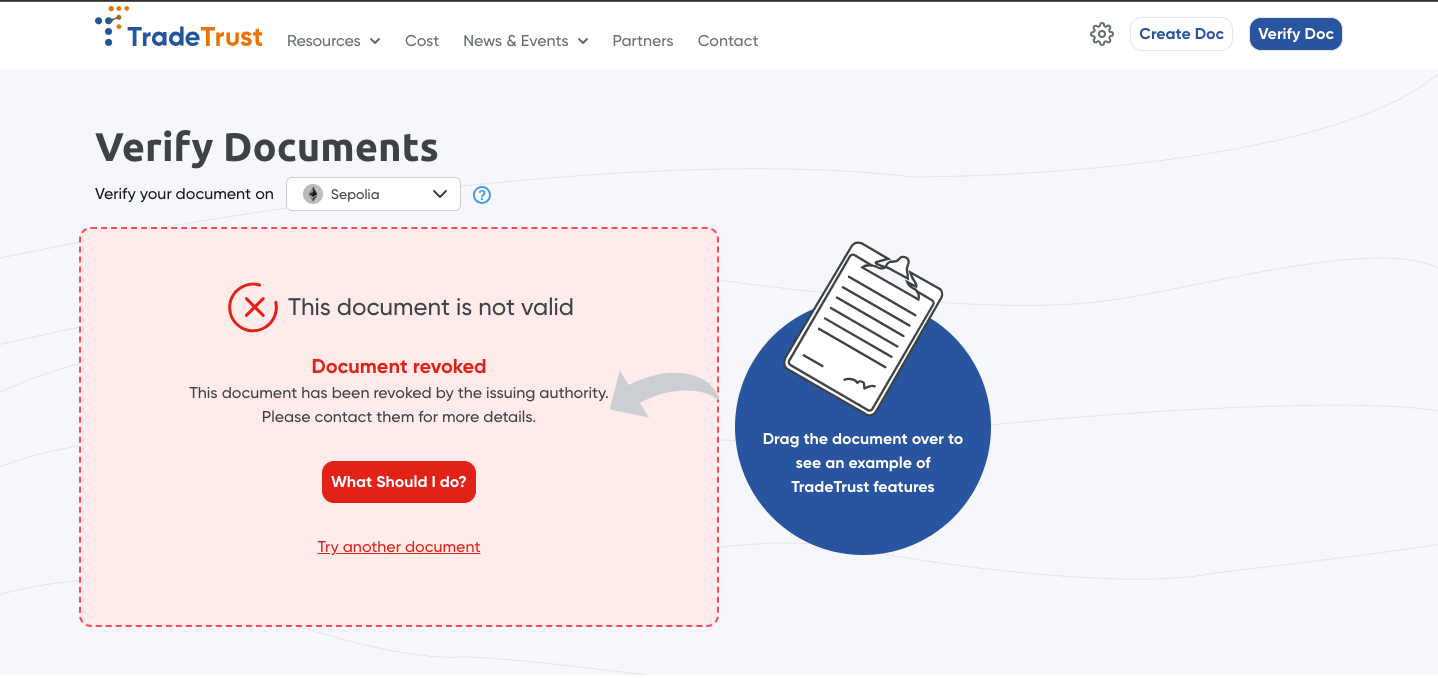
The document has been revoked, thus, we do not display the content of the document on our document viewer.
Revoking multiple documents
If you open the previously wrapped documents side by side, you will notice:
- they have a different
targetHash: it uniquely identifies any document - they have the same
merkleRoot: it uniquely identifies any group of wrapped documents.
The CLI command shown above automatically uses the targetHash to revoke individual documents. To revoke an entire batch of documents using the merkleRoot, you need to use the Code approach which allows you to specify the hash manually:
- when using the
targetHash, only the individual document will be revoked. - when using the
merkleRoot, all the documents wrapped together (in the same batch) will be revoked.
Misc questions:
Q: hey you mentioned that if I use DID documents, I would not need to pay for transactions, but following this flow, I would still have to pay for at least 1 transaction (deploying a documentStore), what gives?
A: yes, you are right, for now this implementation will still need at least 1 transaction to the ethereum blockchain. We are working on this so please be patient and watch this space.
Q: this might be a weird question but I did not issue any documents from the deployed documentStore, how am I able to revoke this document from said documentStore when in the first place, I did not even issue anything?
A: long story short, the revocation mapping in the documentStore is a separate mapping from the issued mapping.