Minting of the Document (CLI)
For the current step, you can either opt to use the CLI or Code.
In this final step, we will mint the transferable record and initialize the first owner and holder for the title escrow.
Prerequisite
You will require the following:
- Wrapped transferable record (JSON file from the wrapping step)
- Wallet with private key (via encrypted wallet file, key file, or environment variable)
Minting a Transferable Record
The TrustVC CLI uses an interactive prompt system that automatically extracts the token registry address, token ID (merkle root), and network from your wrapped document.
To mint the transferable record, simply run the following command:
trustvc token-registry mint
The CLI will interactively prompt you for:
- Document path: Path to your wrapped document file (e.g.,
./wrapped-documents/document-1.json)- The CLI automatically extracts the token registry address, token ID, and network from the document
- Verifies the document signature before proceeding
- Beneficiary address: The initial owner/recipient of the document (e.g.,
0x6FFeD6E6591b808130a9b248fEA32101b5220eca) - Holder address: The initial holder of the document (can be the same as beneficiary)
- Wallet selection: Choose between encrypted wallet, private key file, or environment variable
- Remark (optional, V5 only): Additional remarks to be encrypted and stored with the token
Example session:
trustvc token-registry mint

? Enter the path to the wrapped document: ./wrapped-documents/document-1.json
ℹ  info      Document signature verified successfully
? Enter the beneficiary address: 0x6FFeD6E6591b808130a9b248fEA32101b5220eca
? Enter the holder address: 0x6FFeD6E6591b808130a9b248fEA32101b5220eca
? Select wallet type: Private Key File
? Enter the path to the private key file: ./key.txt
? Enter remarks (optional, press Enter to skip): This is a test remark
Once the document has been minted, you will be able to see an output similar to the following:
ℹ  info      Issuing 0x0d9839a8034cb783d98bd57bcbaafb4dc3614c4193d2edf8a655c1ec6635b7ea to the initial recipient 0x6FFeD6E6591b808130a9b248fEA32101b5220eca and initial holder 0x6FFeD6E6591b808130a9b248fEA32101b5220eca in the registry 0x1E63411DC2fCd6Fab5EE938622f5f6A390F48272
…  awaiting  Sending transaction to pool
…  awaiting  Waiting for transaction 0xaff547d8f608ca17c4c33acef1788ee0b0cc177abb1efcb868250dbecdde46cf to be mined
✔  success   Token with hash 0x0d9839a8034cb783d98bd57bcbaafb4dc3614c4193d2edf8a655c1ec6635b7ea has been issued on 0x1E63411DC2fCd6Fab5EE938622f5f6A390F48272 with the initial recipient being 0x6FFeD6E6591b808130a9b248fEA32101b5220eca and initial holder 0x6FFeD6E6591b808130a9b248fEA32101b5220eca
ℹ  info      Find more details at https://sepolia.etherscan.io/tx/0xaff547d8f608ca17c4c33acef1788ee0b0cc177abb1efcb868250dbecdde46cf
🎉 Congratulations, you have completed the getting started guide and minted your first transferable record.
Verifying your transferable record
To verify your transferable record, simply head over the https://dev.tradetrust.io/verify. You will be able to drop your transferable record (found in wrapped-documents folder from the previous steps) into the dropzone and see something similar to the following:
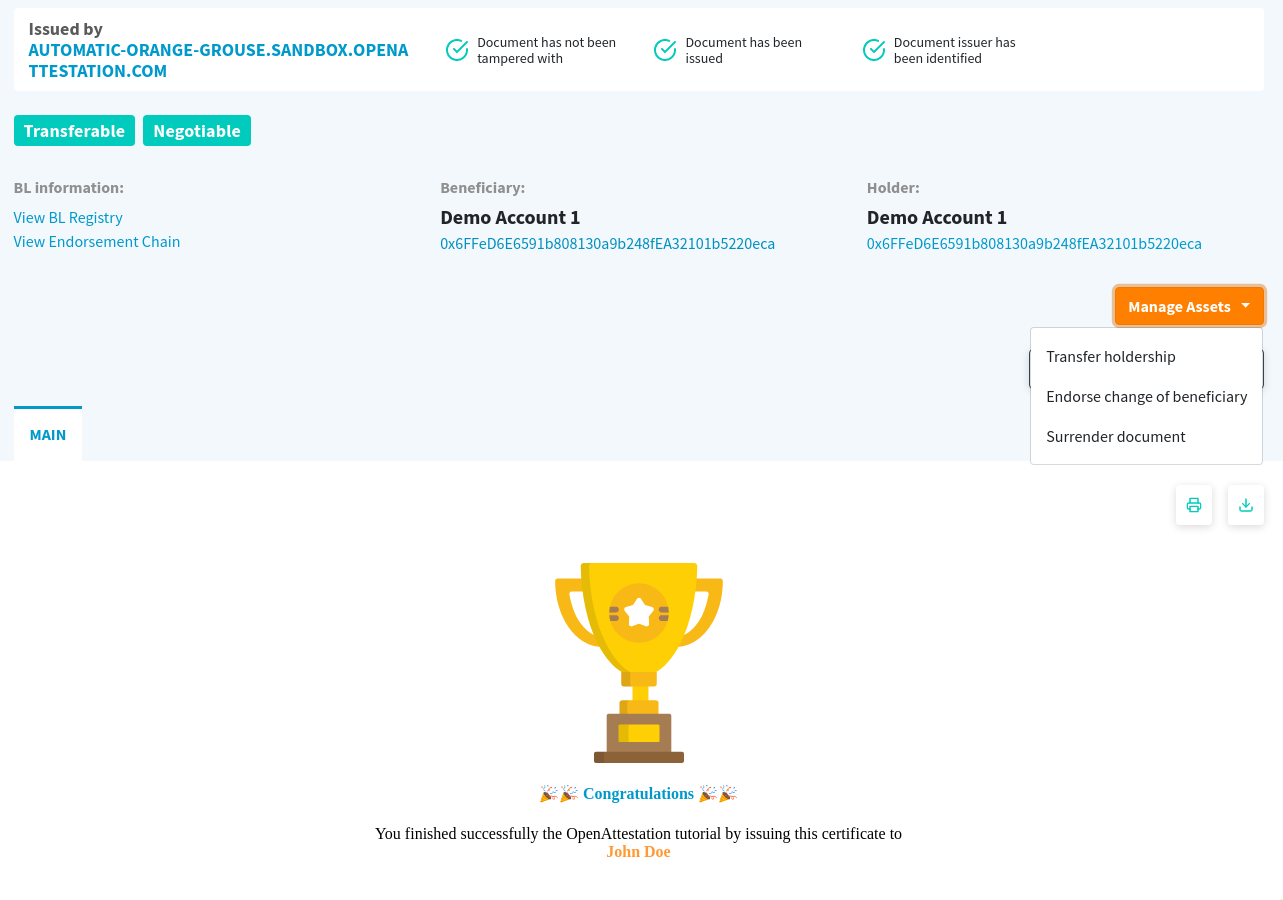
Notice you are able to click on Connect Wallet when logged in to either the owner or holder to gain access to actions to change the ownership and holdership of the transferable record.